
Yuff (![[personal profile]](https://www.dreamwidth.org/img/silk/identity/user.png) randomtology) wrote in
randomtology) wrote in ![[community profile]](https://www.dreamwidth.org/img/silk/identity/community.png) yuff2017-09-16 08:43 pm
yuff2017-09-16 08:43 pm
randomtology) wrote in yuff2017-09-16 08:43 pm


Entry tags:
Phone CR Chart! (Trails of Cold Steel Inspired)
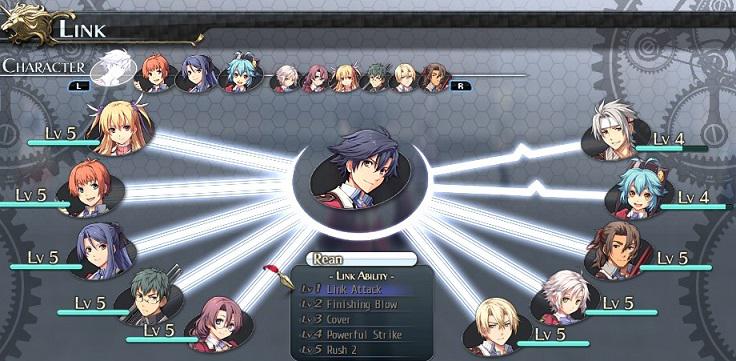
Howdy all! I'm in an RP that uses phones as their network device, so I decided to make some CR charts that fit the theme! Not only that, but the blue one is in the flavor of The Legend of Heroes: Trails of Cold Steel's menu, for any fans of the series!

NOTES:
The bottom buttons are fully functional! They are how you return to the navigation screen.
The blue one is heavily inspired by the Legend of Heroes: Trails of Cold Steel video game series and its social link system. The yellow one has no real fandom association.
On the yellow one, you'll have to enter in color codes for the text/bar color in the ranking area. For my own, I used the colors to rate their overall opinion (Green = Like/ Yellow = Neutral/ Red = Dislike / Gray = Unsure). If no color is added, it'll default to black.
On the blue one's bars, If the value is above 98, replace border-radius: 10px 0px 0px 10px; with just border-radius: 10px;
A phone background image can be changed/added to the phone. For best result, it should be a height of 493px and width of 286px. It will automatically resize any images to fit.
Extra screens can be added! Here's a good example. You just have to reassign one of the bottom buttoms to go to a new screen, though this is pretty advanced coding to pull off.
Modifications are totally fine. I'd love to see what you do with it though!
Comments are nice but not necessary. However, please leave the credit line on!
If you like what you see, I am currently taking commissions! Take a look!


|
|
YELLOW CODE: |
BLUE CODE: |
NOTES:
no subject
no subject
I looked into the issue, and unfortunately it's an issue that not much can be done. The tag that's used to make the links work is a name="NAME", which technically "a name" is a dead tag according to current HTML "grammar" as you might say. So the reason it's borking some on firefox is because the browser with newer updates is recognizing it less and less. Not sure why it's just skipping around like it is, but browsers can be like that. Meanwhile chrome is much more willing to allow the code to keep working, so that's why it's fine on Chrome.
Now, ideally we could update the HTML language to be what's currently "grammatically correct", which would be a id="NAME", but at this time Dreamwidth doesn't let us use that tag as it's running on an older UI (also ID might mess with the CSS of the entire site so I can see why they're reluctant to give us that power). I tried several ways to make it work, but I couldn't make it go. If someone else could figure it out, I'd love them long time.
So TLDR: Firefox is being persnickety about using modern HTML grammar while DW is insisting on using old HTML grammar, and we're a little stuck between a rock and a hard place.
Sorry! I wish I had a better answer. If I do come up with a fixed solution, I'll let you know.
no subject
i had just been wondering if there was a method and if there isn't, it is was it is. i thought there might not be since it didn't seem as though the code was "incorrect" to me, either. if it's a browser issue, at least i know i haven't messed up your awesome code. thank you so much for looking into this for me, i appreciate it!
no subject
Also just wanna let you know I love what you did with it!! It looks so cute. :>
Enjoy using the code!! And yeah if I ever come up with some fix, I'll let you know, though that'll probably be a long while if ever.
no subject
thank you! i'm very happy with how it turned out!
thanks!! and no problem, thanks for taking time out to take a look at all.